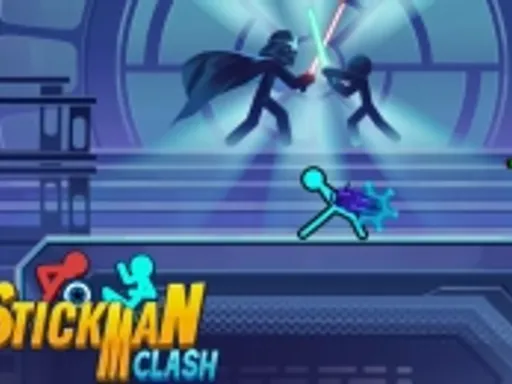
Stickman Clash


Rating:
4.27
Played:
27,580
What is Stickman Clash
Stickman Clash is a fast, funny action brawler where simple stick figures turn into chaotic warriors. Each round drops you into a small arena, hands you a weapon or lets you grab one, and asks one question: can you outplay everyone before the stage turns against you? The charm comes from its mix of quick reactions and silly physics. Characters tumble, weapons swing wide, and a lucky shove can flip a fight in one second.
At the same time, the rules are easy to learn. You move, jump, attack, and use the arena to your advantage. That makes Stickman Clash great for short breaks, friendly rivalries, and casual players who still want depth. Many versions include multiple modes such as solo battles, versus matches, and survival style rounds where waves of enemies keep coming.
Play Stickman Clash in Your Browser
If you want instant action without installs, you can play Stickman Clash in your browser on https://electricman.org. Open the site on Chrome, Edge, Firefox, or Safari, load the game, and you are ready to fight. Browser play is perfect for quick sessions because you can start a match in seconds and stop just as fast.
For the smoothest experience, close heavy tabs, keep your browser updated, and use a stable connection if your version supports online play. If you are on a laptop, plugging in your charger can also help performance because some devices slow down on battery saver modes.
How to Control Stickman Clash
PC and Laptop Controls
Most browser builds use a familiar keyboard layout:
Move with W, A, S, D.
Jump with Space.
Attack with your action key or left mouse click.
Pick up items or interact with E.
Switch weapons with Q when the mode supports multiple weapons.
Because versions can differ slightly, always check the in game controls screen the first time you play. Some builds also support local multiplayer, where each player uses a different key cluster on the same keyboard.
Mobile and Touch Controls
On touch screens, Stickman Clash usually maps movement to an on screen joystick and maps attacks to tap buttons. If you play on mobile, use a steady grip and keep your thumbs relaxed. The game rewards timing more than frantic tapping.
Movement and Combat Tips
In this game, movement is defense. Small steps help you bait swings, while jumps help you avoid floor hazards and weapon arcs. Try to fight near the center when you are learning, then push opponents toward traps once you understand each arena. When a weapon drops, decide fast: grab it if you can do it safely, or strike the opponent during the pickup animation.
Where Stickman Clash Comes From
Stickman Clash belongs to a long line of stick figure fighting games that focus on readability and speed. The stickman style keeps the screen clean, so you can track hits, spacing, and hazards even when the match gets loud. Modern versions lean into two dimensional physics combat and party game randomness, which is why battles often feel like a highlight reel.
The name Stickman Clash is also used on mobile versions, and those editions often emphasize quick rounds, physics driven hits, and multiple modes. Because the game exists in different releases across platforms, you may notice differences in weapons, skins, or menus depending on where you play.
Game Modes You Will See Often
Versus Duels
Versus is the classic match style. You face a friend or a CPU opponent, learn weapon timing, and play the arena. A good duel has a rhythm: poke, retreat, punish, then finish.
Survival and Boss Style Rounds
Survival mode pushes endurance. Enemies arrive in waves, and your goal is to stay alive while collecting better tools. Some versions add boss fights where one enemy has extra health or unusual patterns.
Party Chaos and Custom Rules
Some releases offer rule switches such as stronger hazards, faster knockouts, or altered gravity. Custom rules keep the game fresh and help groups of different skill levels enjoy the same match.
Frequently Asked Questions
Is Stickman Clash free to play?
Stickman Clash is commonly offered as a free game in the browser, and many mobile editions are also free to download. Features can vary by platform, so you may see differences in skins, modes, and ads depending on the version you play.
Can I play Stickman Clash on mobile?
Yes. There are mobile editions, and touch friendly controls are typical. If you prefer the sharpest inputs, a keyboard on desktop usually feels more precise for timing and spacing.
Does Stickman Clash have multiplayer?
Many versions support multiplayer, often as local matches with friends on the same device. Some platforms also support online play depending on the edition. If you do not see an online option, your build is likely local only.
Why is it lagging in my browser?
Lag usually comes from one of three things: a busy browser, a slow device, or a heavy background download. Try closing other tabs, turning off extensions you do not need, and lowering the game quality setting if available. A quick refresh often fixes audio or input delay too.
How do I get better quickly?
Start with basics. Learn one weapon type, practice spacing, and focus on staying balanced. Overcommitting is the fastest way to lose. Wait for an opponent swing, step aside, then punish during recovery. Also learn each arena hazard so you stop taking free damage.
Is Stickman Clash safe for kids?
Stickman Clash uses cartoon stick figures and playful action, so it usually feels light. Still, parents should check the specific version they are using, since ads and online features depend on the platform.
Play Stickman Clash on Electricman.org
If you want a quick way to jump in, play Stickman Clash on https://electricman.org. You will get instant access in your browser, simple controls, and repeatable matches that are perfect for short breaks or long rivalries. Once you learn the timing, Stickman Clash becomes the kind of game where one more round turns into ten.
Comments
Loading comments…